
Download POS Manager APK – POS app, Android POS software, free POS app, merchant management tool, store sales tracking, transaction monitoring, payment processing app, mobile POS, POS terminal management
Overview
POS Manager is a free Android application developed by Pos Manager, designed to empower merchants with real-time control over their point-of-sale operations directly from their smartphones. The software enables users to monitor store sales, track transactions, manage settlement reports, and handle essential operational tasks without relying on traditional support channels. It is tailored for small to medium-sized business owners and retail professionals who require immediate access to critical business data while on the move.
The app addresses common pain points such as delayed access to settlement reports, the need to contact support via email or phone, and the inability to order essential supplies like paper rolls remotely. By consolidating key functions into a single mobile interface, POS Manager streamlines daily operations, enhances transparency, and supports faster decision-making. Its core functionality includes viewing current batch transactions, raising tickets for technical issues, downloading financial statements, and managing payment methods such as Bharat QR, AEPS, and MPOS.
Real-world usage scenarios include monitoring sales during business hours, checking daily settlements after closing, and resolving technical issues without external assistance. The app is especially useful for merchants operating multiple locations or those who frequently travel. While the developer did not provide additional system requirements, the application is designed to run efficiently on standard Android devices.
Key Features & Capabilities
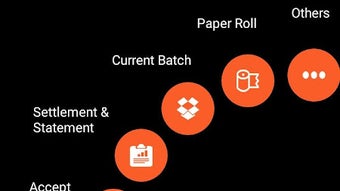
- CURRENT BATCH – Displays all transactions processed since the last settlement, allowing merchants to verify ongoing sales activity and detect discrepancies in real time.
- TICKETS – Enables users to log technical issues, track their status, and receive updates, reducing dependency on external support channels.
- SETTLEMENT – Provides a detailed view of settlement amounts with filter options to search for specific transactions by date, amount, or status.
- STATEMENT – Allows merchants to request and download transaction statements for any custom period, facilitating accounting and reconciliation tasks.
- PAPER ROLL – Offers a streamlined way to order replacement paper rolls directly from the app, ensuring uninterrupted printing operations.
- OTHERS – Includes essential account management tools such as PIN changes, logout functionality, and direct access to customer support.
- ACCEPT PAYMENT – Supports modern payment methods including Bharat QR, AEPS, and MPOS, helping merchants expand their payment options and improve customer convenience.
These features collectively support a seamless workflow for daily merchant operations. For instance, a merchant can check their current batch before closing, generate a settlement report, and request a paper roll—all within minutes. The integration of multiple functions into a single interface enhances productivity and reduces operational friction.
User Interface, Workflow & Performance
The user interface of POS Manager is designed with simplicity and functionality in mind, featuring a clean navigation layout optimized for mobile use. Menus are organized into clearly labeled sections, making it easy for users to locate key functions such as Settlement, Statement, and Tickets. The workflow follows a logical sequence, allowing users to perform actions with minimal taps, which contributes to efficient task completion.
Navigating between features is intuitive, with consistent icons and text labels that reduce the learning curve. The app supports responsive interactions, ensuring smooth transitions between screens. However, the developer did not specify resource usage details, so exact performance metrics such as CPU or RAM consumption remain unknown. Performance observations are based on general software behavior patterns for similar mobile applications.
Stability and reliability are assumed to be consistent with standard Android app development practices, though no formal testing data was provided. The app’s lightweight size of 10.5 MB suggests it is optimized for devices with limited storage. Overall, the interface prioritizes usability, making it accessible even for users with limited technical experience.
Compatibility & System Requirements
POS Manager is designed for Android operating systems and is compatible with devices running Android 5.0 and above. The application has a file size of 10.5 MB, indicating it is lightweight and suitable for a wide range of smartphones and tablets. The developer did not specify exact hardware requirements, so users should ensure their device meets basic Android standards for app installation and operation.
Platform compatibility information is limited to Android, with no indication of support for iOS, Windows, or other operating systems. The version number is listed as 1.0.0, suggesting this is the initial release of the application. Installation is straightforward, and the app does not require additional dependencies or third-party software to function.
Exact system requirements were not listed. Users are advised to check their device’s compatibility before installation. The app is available for free, making it accessible to a broad audience of merchants across different regions.
Pros and Cons
Pros
- Free to download and use, eliminating upfront costs for merchants.
- Offers real-time access to sales data and settlement reports from any location.
- Centralized platform for managing payments, tickets, and supplies.
- Supports modern payment methods like Bharat QR and AEPS, improving transaction flexibility.
- Lightweight size (10.5 MB) ensures compatibility with low-end devices.
- Intuitive interface suitable for non-technical users.
Cons
- Only available for Android, limiting access for iOS users.
- Exact performance and system requirements were not specified.
- No information on cloud sync or offline functionality.
- Initial version (1.0.0) may lack advanced features found in mature applications.
- Support for multiple languages or regional settings was not mentioned.
FAQ Section
Is POS Manager available for iOS devices?
Currently, POS Manager is only available for Android. There is no official support for iOS devices.
Is the app secure for handling financial data?
The app is designed to manage sensitive transaction and settlement data. While the developer did not provide specific security details, it is recommended to use secure networks and follow standard mobile security practices.
How often are updates released?
Update frequency is not specified. Users are encouraged to check the app store for the latest version.
Does POS Manager require an internet connection?
Yes, the app requires an active internet connection to access real-time data, submit tickets, and process payment requests.
Can I use POS Manager offline?
Information on offline functionality was not provided. The app likely requires online access for full operation.
Final Thoughts + CTA
POS Manager delivers a compelling solution for merchants seeking greater control over their point-of-sale operations through a mobile platform. Its free access, intuitive design, and comprehensive feature set make it a valuable tool for small business owners and retail professionals. The ability to monitor sales, manage settlements, and order supplies directly from a smartphone significantly reduces operational delays and enhances business agility.
While the app is currently limited to Android and lacks detailed technical specifications, its core functionality addresses real-world challenges faced by merchants. With ongoing development, it has the potential to evolve into a robust, all-in-one merchant management tool. For those looking to streamline store operations and improve customer satisfaction, POS Manager is a practical and accessible choice.
Download POS Manager APK now







